 Zyrox
ZyroxThe Difference Between Air Cooling and Liquid Cooling
Understand the real tradeoffs between air coolers and liquid cooling — performance, noise, maintenance, and cost for your PC build.
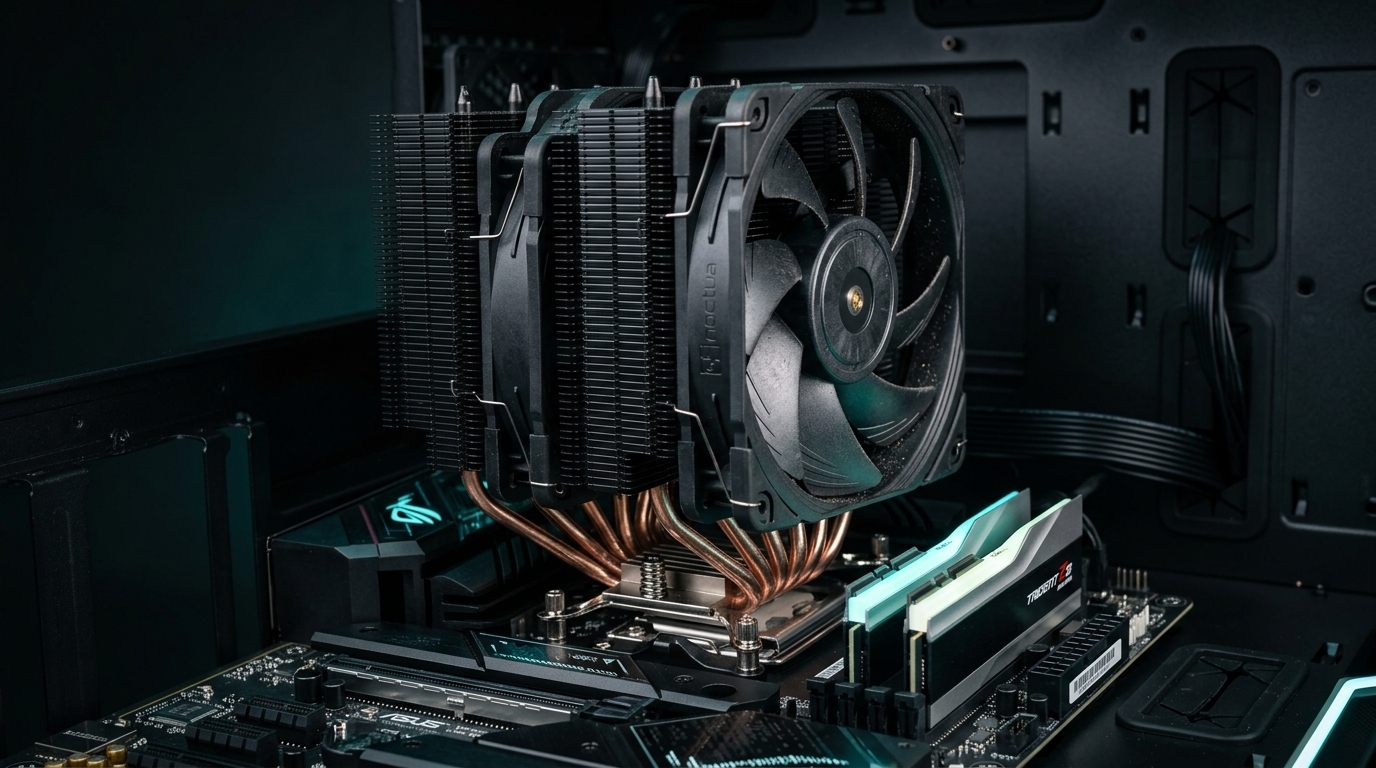 I've built systems with both and tested them against each other at the same price points. The short version: the marketing around liquid cooling overstates its thermal advantage in most real-world scenarios, and air cooling is underrated by everyone except the people who've actually measured both. But there are legitimate situations where liquid cooling wins — and I'll be honest about those too.
How Each System Works Mechanically
An air cooler works through direct conduction and convection. The CPU generates heat through its integrated heat spreader. A metal base plate sits on it with thermal paste bridging the gap. Heat conducts through the base plate into copper heat pipes, which carry it up to a large aluminum fin stack. Fans move air through those fins and carry the heat out of the case. The beauty of this design is simplicity. The fan is the only moving part, and fans are cheap to replace.
An AIO (All-In-One) liquid cooler replaces that heatsink with a fluid loop. A copper cold plate sits on the CPU, and a small pump circulates coolant through tubes to a radiator mounted elsewhere in the case. Fans on the radiator push air through it, cooling the liquid, which then returns to the cold plate. AIOs have more moving parts — the pump runs continuously and is not easily replaceable if it fails.
Performance Comparison at the Same Price Tier
This is where a lot of content gets misleading. People compare a $50 air cooler to a $120 AIO and declare liquid cooling the winner. Compare them at the same price and the picture changes.
At the $35 to $50 tier, a modern high-performance dual-tower air cooler like the Thermalright Phantom Spirit 120 SE or Peerless Assassin 120 punches wildly above its price class, matching or outperforming many budget 240mm AIOs while eliminating pump failure risks entirely.
At the $80 to $100 range, a quality 240mm AIO trades blows with a premium dual-tower air cooler. In burst workloads, a large fin stack absorbs heat spikes instantly. In sustained high-wattage loops, the liquid radiator's larger thermal mass gradually takes over.
Above $110 to $150 is where 360mm AIOs pull ahead decisively. On high-TDP flagship processors (like a Core i7-13700K/14700K or i9-14900K pulling 253W+ in all-core production), a 360mm AIO with a thick radiator (such as the Arctic Liquid Freezer III 360) sustains lower core temperatures than even the largest air coolers, preventing thermal throttling from clipping peak boost clocks.
To illustrate real-world thermal scaling on an Intel Core i7-13700K running stock Intel power limits (253W PL2) during a looped Cinebench R23 multi-core stress test:
- Budget Single-Tower (e.g., Hyper 212): Hits 100°C thermal throttle threshold almost immediately, dropping all-core clocks to prevent overheating.
- Top-Tier Dual-Tower Air (Thermalright Phantom Spirit / Noctua NH-D15): Stabilizes at 92°C to 95°C, pulling roughly 240W–250W without hard thermal throttling.
- Quality 240mm AIO (Arctic Liquid Freezer III 240): Runs around 88°C to 91°C.
- High-Performance 360mm AIO (Arctic Liquid Freezer III 360): Pulls the full 253W package power while holding steady at 81°C to 84°C.
In everyday gaming (where CPU power consumption drops to 65W–120W), all of these dual towers and AIOs run quietly in the comfortable 55°C to 68°C window. But when heavy all-core rendering pushes 250W+, only a 360mm radiator provides true thermal breathing room.
Reliability: This Is the Most Important Practical Difference
An air cooler's failure modes are almost trivially manageable. The fan bearing wears out after 5 to 7 years and you replace it for $15. Thermal paste dries out every 3 to 4 years and you reapply it. That's about it. Fin corrosion would take decades.
An AIO can fail in more dramatic ways. Pump failure is uncommon but not rare, and the entire unit must be replaced. Coolant slowly evaporates through the tubing over years, which you'll detect as gradually rising temperatures. Tubing can crack, especially on budget units. And while it's rare, a radiator leak near your motherboard is catastrophic.
Quality AIOs from brands like Corsair, NZXT, and Arctic have reliability well beyond their 5-year warranties. Budget AIOs are a different story — I've personally seen pump failures inside two years on no-name 240mm units. The risk isn't that AIOs are unreliable. It's that when they fail, they can fail badly. Air coolers fail gracefully.
Noise Comparison at Sustained Load
For quiet operation, air coolers generally have an advantage at equal thermal performance. A large 140mm fan at 800 RPM moves significant air volume at very low noise. AIOs require radiator fans to push air through a denser fin structure, demanding higher RPM for the same heat dissipation. On top of that, AIOs have pump noise — a constant low hum that some people find acceptable and others find irritating.
The Noctua NH-D15 with its NF-A15 fans at 800 RPM is one of the quietest high-performance coolers available. A 360mm AIO running fans at comparable speeds will be audibly louder due to the combined fan and pump noise. If silence is a priority and you're not running an extreme TDP chip, air cooling wins the noise battle.
Case Compatibility Issues
Large dual-tower air coolers can be tall. The Noctua NH-D15 measures 165mm, and many mid-tower cases support only 155mm or 160mm of clearance. Always check your case spec before buying.
RAM clearance is another real issue. Large tower coolers often overhang the first one or two RAM slots. The NH-D15's front fan can physically interfere with tall DDR5 heat spreaders. The workaround is low-profile RAM, mounting the fan higher, or buying a cooler like the NH-D15S that offsets toward the front of the case to clear all four slots. AIOs have no RAM clearance issue at all.
360mm AIOs require a case with a 360mm mounting point, typically the top or front panel. Not all mid-tower cases support 360mm top mounting. Check your case's maximum radiator length before committing.
When to Choose Which
Go with air cooling if your budget is $50 to $100, if silence matters, if your case has limited radiator space, if your CPU TDP is under 125W, or if you simply value long-term reliability and simplicity.
Go with an AIO if you're running a high-TDP chip like the i9-13900K or Ryzen 9 7950X, if aesthetics and a clean build matter to you, if your case is compact but has radiator mounts, or if you're overclocking aggressively and need sustained thermal headroom.
For gaming-focused builds with processors like the Ryzen 7 7800X3D, Ryzen 7 7700X, or Core i5-13600K/14600K, a top dual-tower air cooler (like the Thermalright Phantom Spirit or Noctua NH-D15) is the smarter choice every time. For sustained 250W+ workstation rendering on a Core i7-13700K/14700K, Core i9, or Ryzen 9 7950X, a 360mm AIO like the Arctic Liquid Freezer III 360 is worth the investment for maximum thermal headroom and silence under prolonged load.
Related Guides
← Back to home