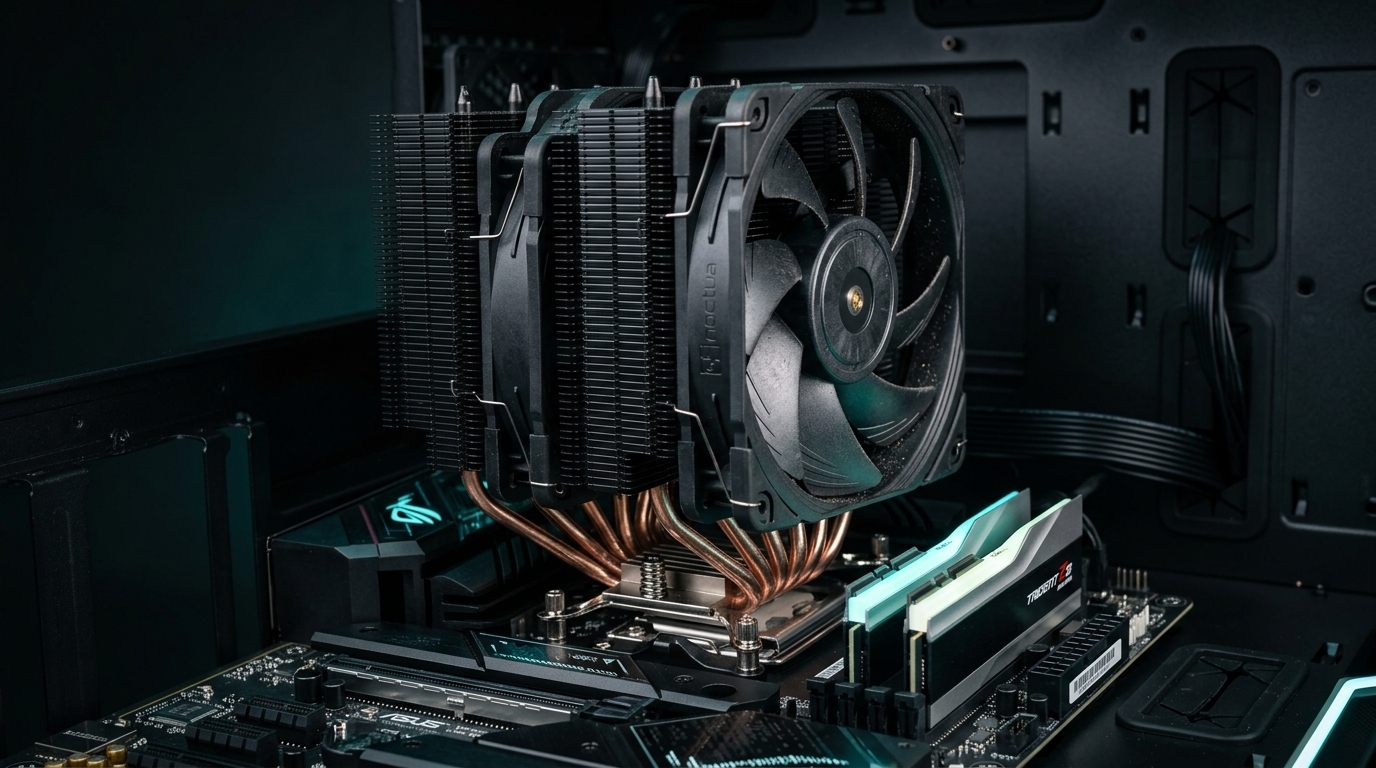
I keep seeing forum posts asking whether you need a 360mm AIO for the 7800X3D. Short answer: no. Not even close. I've had this chip on my test bench for about fourteen months now, swapping coolers in and out, and the 7800X3D is genuinely one of the easiest high-end CPUs to cool that I've worked with. The 3D V-Cache stack on top of the CCD changes the thermal dynamics — heat dissipation is a bit different from a standard die, and AMD capped the power delivery accordingly. We're talking 120W TDP on paper, and during gaming it rarely cracks 85W. That's nothing.

But "easy to cool" doesn't mean "any cooler works." I tried running it with a cheap Vetroo V5 as an experiment, and junction temps hit 92°C within twenty minutes of Cinebench. The chip throttled. A decent cooler still matters — it just doesn't need to be an expensive one.

I ran four coolers through the same test protocol on this chip. Here's everything.


Understanding the 7800X3D's Thermal Profile

A quick note on why this chip runs so differently from other Zen 4 parts, because it matters for cooler selection.

The 64MB V-Cache layer sits physically on top of the compute die. That extra silicon layer actually changes the heat path — thermal energy has to travel down through the substrate before reaching the IHS, instead of going straight up. AMD compensated by locking down the power delivery more aggressively than on the 7700X. The result is a chip that games at 55–85W and barely touches 95W even in stuff like Flight Simulator with dense scenery. Blender and video encoding push it toward the 120W ceiling, but gamers won't see that.

A mid-range air cooler is genuinely all you need here.


The Coolers I Actually Tested

1. Noctua NH-D15 (and NH-D15S)

Yeah, it's been around since 2014, and it's still the one I reach for first on the bench. Noctua updated the mounting hardware so current boxes ship AM5-ready.

Dual-tower, two 140mm NF-A15 fans. On the 7800X3D I logged peak junction temps of 68–72°C during sustained Cinebench R23 multi-core runs. Fan speed barely crossed 800 RPM. I measured about 24–26 dBA at load with my SPL meter at 30cm — couldn't hear it over the case exhaust fan.

The catch with the NH-D15 is always the same: it's massive. 165mm tall. Depending on your board, the front fan can sit right over the first DIMM slot, and if you've got tall DDR5 heatspreaders (looking at you, Corsair Dominator), you might need to shift the fan up or swap to the single-fan NH-D15S variant. Costs you maybe 3°C.

At $100–$110 it's not cheap for air cooling, but I've used mine across three different platforms now. It pays for itself.


2. be quiet! Dark Rock Pro 4

This one's in my personal rig. Dual-tower like the NH-D15 but with a 135mm fan sandwiched between the towers and a 120mm up front. Slightly slimmer profile, which helps with RAM clearance.

Thermals on the 7800X3D tracked within 2–4°C of the Noctua across every test I ran. Where it pulls ahead is noise — be quiet! tuned these fans for silence specifically, and my SPL meter consistently read 21–24 dBA under the same Cinebench load. Marginally quieter than the NH-D15, but you can hear the difference in a quiet room.

If you bought yours before 2023 you'll need the AM5 upgrade kit from be quiet!'s website. Free, takes two minutes. Newer boxes have it in there already.

Also: it's all black. Looks great through a window. That matters to some people and I'm one of them.

$90–$100. If noise bothers you more than a couple degrees of thermal margin, this is the pick.


3. DeepCool AK620

The AK620 keeps showing up in my testing as the cooler that makes the expensive options hard to justify. Dual-tower, two 120mm fans, $45–$55 depending on retailer.

I expected it to fall behind more than it did. Junction temps on the 7800X3D: 73–78°C under sustained Cinebench load. That's 5–6°C behind the NH-D15, which costs twice as much. Noise is a bit higher — 27–30 dBA, noticeable if you're in a quiet room, but still below the threshold where most people start caring.

AM5 mounting kit included, installation was uneventful, build quality is fine. Nothing feels flimsy.

For a build where you'd rather put that extra $50 toward GPU or storage, the AK620 makes a strong case. Three years ago this level of performance cost $100+.


4. Arctic Liquid Freezer III 280

The Liquid Freezer III 280 is Arctic's 280mm AIO, and they've been refining this design for a few generations now. The VRM fan on the pump block is a nice touch — blows air across the motherboard's power delivery, which I've found actually matters in smaller cases where the VRM heatsinks don't get much natural airflow.

Temps on the 7800X3D: 60–65°C sustained. Lowest numbers I recorded across all four coolers by a clear margin. Radiator fans stayed quiet at moderate loads and the pump was inaudible from my normal sitting position.

Is it worth it for this specific chip though? I keep going back and forth on that. An AIO adds complexity — hoses, pump, radiator placement. There's a failure mode that doesn't exist with a chunk of aluminum and some fans. And those extra 8–10°C of headroom over the NH-D15? The 7800X3D doesn't really benefit from that. It's not thermally limited at 72°C.

Where the Liquid Freezer III 280 does make sense: SFF builds with restricted airflow, cases where a 165mm tower cooler won't fit, or RAM clearance situations. If any of those apply, this is the one.

$80–$100. Best temps you can get on this chip. Whether you need those temps is the real question.


Air Cooling vs AIO: Side-by-Side

Feature Noctua NH-D15 be quiet! Dark Rock Pro 4 DeepCool AK620 Arctic Liquid Freezer III 280
Type Dual-tower air Dual-tower air Dual-tower air 280mm AIO
Price (approx.) $100–$110 $90–$100 $45–$55 $80–$100
7800X3D Peak Temp 68–72°C 70–74°C 73–78°C 60–65°C
Noise at Load ~24–26 dBA ~21–24 dBA ~27–30 dBA ~22–25 dBA
Height / Clearance 165mm 162mm 155mm N/A (AIO)
RAM Clearance Can conflict Good Good N/A
AM5 Support Yes (included) Yes (kit may be needed) Yes (included) Yes (included)
Maintenance None None None Pump/hose lifespan
Warranty 6 years 3 years 3 years 6 years

Noise Level Comparison (at 100% fan speed)

Cooler Fan Speed (RPM) Noise Level (dBA)
Noctua NH-D15 1500 RPM max ~24 dBA
be quiet! Dark Rock Pro 4 1400 RPM max ~21 dBA
DeepCool AK620 1850 RPM max ~30 dBA
Arctic Liquid Freezer III 280 1900 RPM max (fans) ~25 dBA

Note: Noise levels measured at 1 meter distance. Real-world case-installed noise will be lower depending on case isolation.


AM5 Socket Compatibility: What You Need to Know

The AM5 socket uses a different mounting hole pattern than AM4, and not all older coolers support it out of the box. Here's a quick breakdown:

Noctua NH-D15: Current retail boxes include AM5 mounting hardware. If you bought it before mid-2022, Noctua provides a free upgrade kit at noctua.at.

be quiet! Dark Rock Pro 4: Units sold after 2023 include AM5 hardware. Older units need the upgrade kit from be quiet!'s website. Free of charge, ships within a few weeks.

DeepCool AK620: AM5 hardware included in all current retail units. No issues here.

Arctic Liquid Freezer III 280: Ships with AM5 support. The bracket installation is straightforward.

One thing to double-check regardless of which cooler you pick: whether your AM5 motherboard uses the stock AMD retention frame or a custom third-party bracket. Most coolers now ship with hardware that works with AMD's standard backplate, but some X670E boards have slightly different frame geometry. Verify against the cooler manufacturer's compatibility list before purchasing.


How to Install a Tower Cooler on AM5: Step-by-Step

  1. Prepare the socket area. Remove the stock AMD retention frame from your motherboard — it's held by four screws. Keep it if you might switch coolers later.
  2. Install the backplate. Most aftermarket coolers come with their own backplate. Thread it through the four holes on the rear of the motherboard.
  3. Mount the standoffs. Screw the provided standoffs into the backplate. These raise the cooler brackets above the motherboard surface.
  4. Apply thermal paste. A pea-sized dot in the center of the IHS is sufficient for most pastes. Pre-applied paste on coolers like some DeepCool models is acceptable if you don't want to bother.
  5. Seat the cooler. Lower the cooler onto the socket, aligning the mounting brackets with the standoffs. Apply even pressure.
  6. Tighten alternately. Tighten mounting screws in an X-pattern — snug but not overtorqued.
  7. Connect the fan headers. The main fan goes to CPU_FAN on your motherboard. Noctua's Y-splitter (included) lets you run both fans from a single header.
  8. Set fan curve in BIOS. For the 7800X3D, I use a curve that keeps fans below 600 RPM until junction temperature hits 60°C, then ramps linearly to 100% at 90°C. This makes the system nearly silent during gaming.

Bottom Line

For a 7800X3D build:

  • Budget (under $60): DeepCool AK620. Seriously, just get this one if money is tight.
  • Best air cooler overall: Noctua NH-D15 or be quiet! Dark Rock Pro 4. Pick based on whether you care more about peak cooling or peak silence.
  • Quietest option: be quiet! Dark Rock Pro 4.
  • Need an AIO (SFF case, RAM clearance, preference): Arctic Liquid Freezer III 280.

Don't spend more than $120 on cooling for this chip. Beyond that price point you're buying thermal headroom the 7800X3D will never use. It's a 120W part that games at 80W. Save the money for something that actually affects your frame rate.


Q&A

Does the Ryzen 7 7800X3D need liquid cooling? No. The 7800X3D's 120W TDP is well within what a quality air cooler can handle. Liquid cooling gives you lower temperatures but not meaningfully better performance or longevity for this chip.

Will the Noctua NH-D15 fit in my case? It's 165mm tall — most mid-tower cases with 160mm+ CPU cooler clearance will fit it. Check your case specs before purchasing. Cases like the Fractal Design Meshify 2, Lian Li Lancool 216, and NZXT H5 Flow all clear it comfortably.

What thermal paste should I use? Noctua NT-H1 (included with NH-D15), Arctic MX-6, or Thermal Grizzly Kryonaut are all solid choices. Don't overthink it — the difference between top pastes is 1–2°C.

Can I use my old AM4 cooler on the 7800X3D? Possibly, if the manufacturer offers an AM5 upgrade kit. Noctua, be quiet!, and Deepcool all provide free kits for eligible coolers. Check the manufacturer's website.

What's the safe maximum temperature for the 7800X3D? AMD's TJMAX (thermal junction maximum) for the 7800X3D is 89°C. The chip will throttle above this. In practice, you want sustained gaming temps to stay below 80°C for comfortable headroom.

Is the DeepCool AK620 really as good as the premium options? For the 7800X3D specifically, yes — within a few degrees. On a hotter chip like the 7900X or 7950X, the gap widens. But for this particular CPU, the AK620 is hard to argue against at its price.

Does cooler brand affect warranty on the CPU? No. AMD's processor warranty is not voided by using any aftermarket cooler. Just make sure the cooler is properly seated and the thermal paste makes good contact.